invinityads

Sabtu, 24 Januari 2009

Vanishing Point in CS Part 2

Here is the second part of the the Vanishing Point Tool tutorial. This will show you how to fit a photo onto a plane.

I have taken a photo of this file.

And this photo.

I have fitted the girl's photo on the file in the proper perspective.

The tutorial is here.

Other tutorials are here.

Rabu, 21 Januari 2009

Vanishing Tool in Photoshop CS

Photoshop CS has a new tool, the Vanishing Point with which you can do a number of amazing things. This tool is not found in Photoshop 7.

I have opened this photo of a truck.

The same truck with a longer body and additional wheels. You can do this with the Vanishing Point Tool.

The tutorial is here.

Other tutorials are here.

Rabu, 14 Januari 2009

Magic Wand Tool

You can make selections with a lot of tools like the Pen Tool and Lasso Tools in Photoshop. You can also make a selection with the Magic wand Tool. Have you ever tried it? It can be done.


I have cut out the little girl from the original background and put her in a new background with the Magic Wand Tool.

The tutorial is here.

Other tutorials are here.

Senin, 12 Januari 2009

Pattern Stamp Tool in Photoshop

You must know about the Clone stamp Tool. I have posted tutorials on it. You will find the Pattern Stamp Tool just below it. Do you know how to use it? You can create marvellous effects with it. You use a number of brushes and layers to create a fantastic effect. All you need is your imagination.

I have used the photo on top to make the poster below with the Pattern Stamp Tool.

The tutorial is here.

Other tutorials are here.

Jumat, 09 Januari 2009

Collage against brick wall

Making a collage is not all difficult. Just select a number of photos of roughly the same size and resolution. They may be of your family or friends or groups of friends or whatever. You will also need a second image for the background. Choose one.

I have chosen a brickwall for the background and a number of photos of Indian actress Aishwarya Rai for my collage.

The tutorial is here.

Other Photoshop tutorials are here.

Kamis, 08 Januari 2009

Clone Tool Special effects

You can clone any part of an image to another document and then jazz it up with special effects. You will also need the Gradient Editor.

The Clone Tool and Gradient was used to crete this special effect.
The tutorial is here.

Other tutorials are here.

Curves Tool - How To Use It

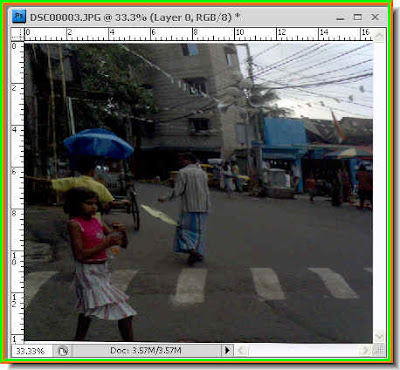
The Curves Tool is an important one to correct your photographs with. You can correct the light, tones contrast as well as color. It is important to know how the Tool works. I have demonstrated some of the important points of the Curves Tool.This a photo I took of a Calcutta street with my mobile phone.
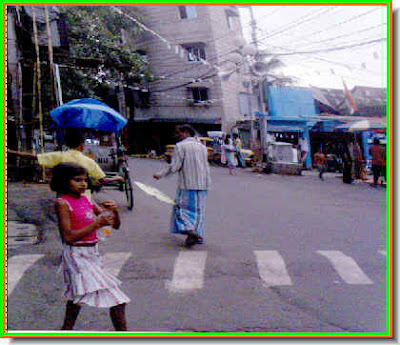
The same photo corrected with the Curves Tool.

The tutorial is here.

Other tutorials are here.