invinityads

Jumat, 06 Februari 2009

Text on Path Part 2

This is another tutorial on text on a path. This tutorial is on an open path.

This is an example of text on an open path.

The tutorial is here.

Other tutorials are here.

Rabu, 04 Februari 2009

Text on Path

You can make Text follow a path, whether it be a circle or a shape or a path created with the Pen Tool.

An example of Text on a path.

The tutorial is here.

Other tutorials are here.

Minggu, 01 Februari 2009

Custom Shape Tool in Photoshop

The Custom Shape Tool is found in all versions of Photoshop and can be used to create an attractive effect. All you need is a photo and you have a variety of Custom Shapes to choose from.

This has been creared with the Custom Shape Tool, one of the many available in Photoshop.
Here is the tutorial.

Other tutorials are here.

Senin, 26 Januari 2009

Text Flaming Text

You can easily create flaming text in any version of photoshop.

The tutorial to create text like this is here.

Other photoshop tutorials are here.


Minggu, 25 Januari 2009

Vanishing Point Tool Part 4

I have showed what can be done with the Vanishing Tool in three previous tutorials. You will find links to them. Here I will show something else that can be done with it.

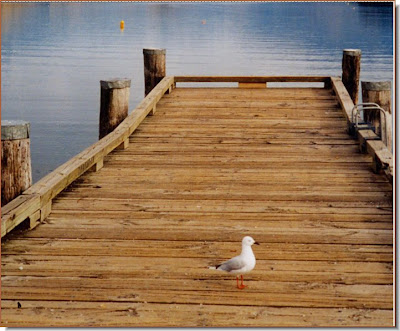
There is a bird on this board wooden board walk.

The bird has been removed with the Vanishing Point tool as if it never existed. None of the boards in the bottom photo are out of place, yet the bird is gone.

The tutorial is here.

Other photoshop tutorials are here.

Vanishing Point Tool in CS Part 3

The Vanishing Point Tool in Photoshop CS is particularly useful for wrapping artwork around an object like a cube. This tool makes it possible to do this easily with a little bit of practice.
I have taken this cube. It is a free stock photo. I have given the link for download it in the tutorial.

Since I don't have any artwork, this photo will do demonstrate how it can be wrapped around the cube.

And there it is wrapped snugly around the cube.

The tutorial is here.

Other photoshop tutorials are here.

Sabtu, 24 Januari 2009

Vanishing Point in CS Part 2

Here is the second part of the the Vanishing Point Tool tutorial. This will show you how to fit a photo onto a plane.

I have taken a photo of this file.

And this photo.

I have fitted the girl's photo on the file in the proper perspective.


The tutorial is here.

Other tutorials are here.